
A GPU (Graphics Processing Unit) is a specialized processor designed to accelerate parallel workloads, especially operations on large matrices and vectors — which is exactly what modern deep learning models need.
Originally built for 3D graphics and rendering, GPUs are now heavily used in:
- Machine Learning (training/inference)
- Scientific computing
| Feature | CPU | GPU |
|---|---|---|
| Designed for | General-purpose tasks | Parallel computation (e.g., matrices) |
| Cores | Few (2–64 high-perf cores) | Thousands of smaller cores |
| Memory | Low-latency, low-bandwidth | High-bandwidth, high-latency |
| Control flow | Optimized for branching logic | Optimized for SIMD (Single Instruction Multiple Data) |
📌 In ML, think:
- CPU → control logic, training orchestration
- GPU → number crunching for tensors (matrix mult, conv, activation…)
Architecture of a GPU (Simplified)
+-----------------------------------------------------+
|                     GPU Die                         |
| +----------------+  +-----------------------------+ |
| |  Control Logic |  |    SIMD Cores (hundreds)    | |
| |  (few cores)   |  |  ALUs, Registers, etc.      | |
| +----------------+  +-----------------------------+ |
| +----------------+                                |
| | High-BW Memory Controller (e.g. GDDR6, HBM2)    |
| +-------------------------------------------------+ |
+-----------------------------------------------------+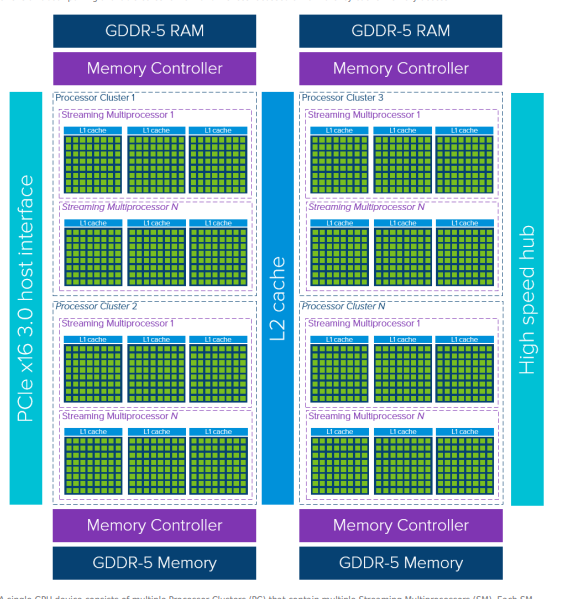
GPU internal blocks:
- SMs (Streaming Multiprocessors)
- CUDA cores
- Tensor Cores
- Cache hierarchy
- Memory (HBM, GDDR)
SM
Each SM has:
- CUDA cores (integer/floating point ALUs)
- Tensor Cores (for matrix ops)
- Registers, shared memory
- Scheduler (handles warps — groups of 32 threads in NVIDIA)
CUDA Cores
- The basic arithmetic units in NVIDIA GPUs.
- They do simple math: add, multiply, move data.
- Operate in SIMT model: Single Instruction, Multiple Threads.
- Threads run in warps (32 threads).
Tensor Cores
- Special cores for mixed-precision matrix math.
- Optimized for deep learning → multiply-add operations (matrix-matrix).
- Boost performance for FP16, INT8, TF32.
- E.g., NVIDIA Volta → Tensor Cores introduced.
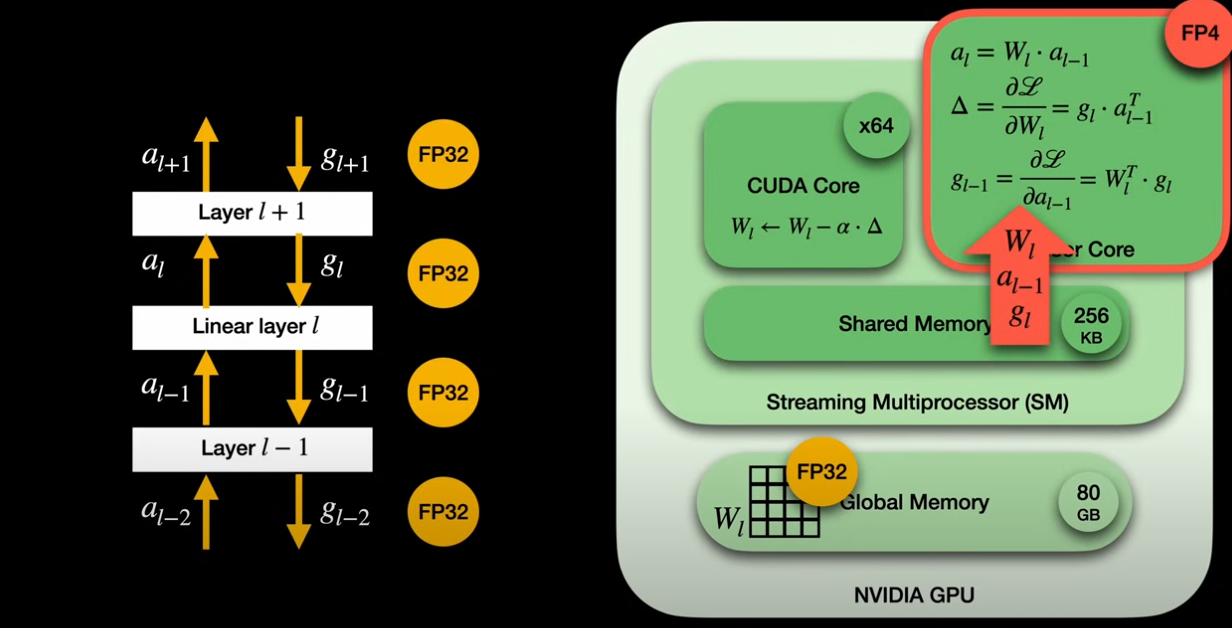
- tensor core do matric multiplication
- cuda core do arthmetic and other things which load the needed weight from global memory to tensor core for multiplicaton
+----------------------+
|       VRAM (DRAM)    |
+----------------------+
           |
           v
+----------------------+
|  Memory Controller   |
+----------------------+
           |
           v
+----------------------+
|      L2 Cache        |  <-- Large SRAM
+----------------------+
           |
           v
+-----------------------------------------------------------+
|                       GPU Chip                           |
|                                                           |
| +------------------+   +------------------+               |
| | SM (Streaming MP)|   | SM (Streaming MP)|               |
| |------------------|   |------------------|               |
| | +--------------+ |   | +--------------+ |               |
| | | Warp Sched   | |   | | Warp Sched   | |  <-- Schedulers |
| | +--------------+ |   | +--------------+ |               |
| | +--------------+ |   | +--------------+ |               |
| | | Registers    | |   | | Registers    | |  <-- SRAM     |
| | +--------------+ |   | +--------------+ |               |
| | +--------------+ |   | +--------------+ |               |
| | | L1 Cache     | |   | | L1 Cache     | |  <-- SRAM     |
| | +--------------+ |   | +--------------+ |               |
| | +--------------+ |   | +--------------+ |               |
| | | Shared Mem   | |   | | Shared Mem   | |  <-- SRAM     |
| | +--------------+ |   | +--------------+ |               |
| | +--------------+ |   | +--------------+ |               |
| | | CUDA Cores   | |   | | CUDA Cores   | |               |
| | +--------------+ |   | +--------------+ |               |
| | +--------------+ |   | +--------------+ |               |
| | | Tensor Cores | |   | | Tensor Cores | |               |
| | +--------------+ |   | +--------------+ |               |
| +------------------+   +------------------+               |
|                                                           |
|     ... more SMs ...                                      |
|                                                           |
+-----------------------------------------------------------+
The entire LLM model is loaded into VRAM (Video Random Access Memory), but computations happen in a much smaller, faster part of the GPU called SRAM
- The full model weights (e.g., 7B parameters) are loaded into VRAM — this is your GPU’s GDDR6X, HBM, etc.
- Why? Because VRAM is big enough (GBs) to hold all those weights.
- VRAM acts as the main store for the model and any big activations or tensors.
Actual compute → on-chip SRAM (caches, registers, shared memory)
- When you run a prompt, the GPU core:
- Loads chunks of weights from VRAM into on-chip L2 Cache (SRAM).
- Then pushes data down into L1 Cache, Shared Memory, and Registers inside the SMs.
- The CUDA Cores or Tensor Cores then do the matrix math on these chunks.
Major GPU Manufacturers
NVIDIA
- King of ML/AI
- CUDA, cuDNN, TensorRT
- Best framework support (PyTorch, TensorFlow, etc.)
- Dominates data center (H100, A100, L40, etc.)
AMD
- Competitive hardware (Radeon, Instinct)
- Uses ROCm (alternative to CUDA) for ML
- PyTorch ROCm support exists, but ecosystem is smaller
Intel
- New in discrete GPUs (Intel Arc, Xe)
- Has oneAPI, XPU, and Level Zero
- Still maturing in ML support
Apple
- M1/M2/M3 chips have built-in GPUs
- Uses Metal Performance Shaders (MPS) backend in PyTorch
GPU in ML Ecosystem
To use GPU in ML code:
- You need framework-level support: PyTorch, TensorFlow, etc.
- Those frameworks need backend support:
torch.cuda→ uses CUDA (NVIDIA)torch.xpu→ uses XPU/Level Zero (Intel)torch.mps→ uses Metal (Apple)torch.device("rocm")→ for AMD
So just having a GPU isn’t enough. You need the right driver + runtime + compiler stack.
What we need
- GPU Hardware : NVIDIA RTX 4060, AMD Radeon RX 6700, Intel Arc A750
- GPU Driver: Translates OS/system calls (like from PyTorch) into instructions the GPU understands. Example
nvidia-driver-550(Ubuntu package) - GPU Runtime API: The library/API layer that ML frameworks use to control the GPU
- Compiler/Kernel Stack GPU kernels are like GPU “functions”. You need a compiler to build and dispatch them.
| Layer | What Happens |
|---|---|
| ML Framework | torch.tensor → creates tensor on CPU, to("cuda") moves to GPU |
| PyTorch Build | Calls into torch._C (C++/CUDA bindings from PyTorch + cu121 build) |
| Compiler | Uses cuBLAS/cuDNN kernel for matmul, or JITs custom CUDA kernel |
| Runtime API | Calls cudaMalloc, cudaMemcpy, cudaLaunchKernel |
| Driver | Accepts kernel dispatch, manages memory on GPU |
| GPU | Executes parallel matmul on thousands of cores |
Python → PyTorch → C++ ops / kernels → CUDA API → NVIDIA Driver → GPU
          |            |                  |             |           | high-level   compiled ops        runtime       hardware
| Vendor | Runtime | Role |
|---|---|---|
| NVIDIA | CUDA | Handles memory allocation, kernel execution, tensor ops |
| Intel | oneAPI Level Zero, DPC++ | Cross-device dispatch |
| AMD | ROCm | Includes HSA, HIP, and drivers |
| Apple | Metal Performance Shaders (MPS) | On Apple Silicon |
| Key GPU Specs That Matter (for ML) |
| Spec | Meaning |
|---|---|
| CUDA Cores / Stream Processors | Parallel execution units |
| Memory Size (VRAM) | How large your tensors can be |
| Memory Type | GDDR6 / HBM2 / shared (affects bandwidth) |
| Tensor Cores | NVIDIA-only: optimized for matrix ops |
| FP32 / FP16 / BF16 | Floating-point precision support |
| Bandwidth | Speed of data movement |
| ECC Memory | Error checking — important in training stability |
| What Happens When You Use GPU in PyTorch? |
When you do:
tensor = tensor.to("cuda")This happens:
- PyTorch copies the tensor from CPU RAM to GPU VRAM
- The GPU kernel (written in CUDA C++) runs your operation (e.g., matmul)
- Results are returned staying in GPU memory unless moved back
This is where CUDA / XPU / ROCm / MPS drivers come into play.
CUDA Graph
Instead of launching kernels and memory copies one by one (like a regular program does), CUDA Graphs record the entire sequence of operations, and then replay them as a single unit.
CUDA Graphs are DAGs (Directed Acyclic Graphs). Each node in the graph is:
- A kernel launch
- A memory operation
- A synchronization operation
The edges represent dependencies (e.g., op B must wait for op A to finish).
decoder in a transformer model like LLaMA 3 runs something like:
- Load KV cache
- Run attention kernel
- Run MLP kernel
- Write back to KV cache
- Generate logits
Without CUDA Graph:
Each of those steps is launched individually, with a tiny CPU→GPU launch for each. This gets expensive for small batches or low-latency apps.
With CUDA Graph:
we record this entire sequence once, for a specific batch size (say 8), and then next time:
cudaGraphLaunch(graphExec, stream); // ONE CALL replaces five kernel launches
CUDA Graphs are batch-size-specific. If you record a graph for batch size 8, you can’t reuse it for batch size 12 without re-recording.
Hence, frameworks (like TensorRT-LLM or vLLM) use a CUDA_GRAPH_MAX_BATCH_SIZE parameter. If your incoming request size ≤ that, you can use the prebuilt graph.
If we go over that size, the graph isn’t used, and you fall back to traditional launch mode (with higher latency).
Note : SGLANG use the above technique
nvidia-smi
Shows NVIDIA GPU details: driver version, GPU name, memory usage, etc.
nvidia-smi
Query GPU memory, name, and utilization only
nvidia-smi --query gpu=gpu_name,memory.total,memory.used,utilization.gpu --format=csv
See detailed hardware + performance data
nvidia-smi -q
LLMs like GPT-3 or GPT-4 are way too big for a single GPU.
You must learn:
- Data Parallelism: Split data across GPUs.
- Model Parallelism: Split model layers across GPUs.
- Pipeline Parallelism: Split forward/backward pass stages.
Frameworks: DeepSpeed, Megatron-LM, NCCL (NVIDIA’s lib for multi-GPU comms).
How Much space need to load model parameters
Each parameter is usually a 32-bit float → 4 bytes. let say 82M paramerters
82 million × 4 bytes = ~328 MB.
- Activations, intermediate buffers, and other overhead come on top.
Model size (number of parameters). Larger models need more memory. Models with tens or hundreds of billions of parameters usually require high-end GPUs like NVIDIA H100 or H200.
Bit precision. The precision used (e.g., FP16, FP8, INT8) affects memory consumption. Lower precision formats can significantly reduce memory footprint, but may have accuracy drops.
A rough formula to estimate how much memory is needed to load an LLM is:
Memory (GB) = P * (Q / 8) * (1 + Overhead)
- P: Number of parameters (in billions)
- Q: Bit precision (e.g., 16, 32), division by 8 converts bits to bytes
- Overhead (%): Additional memory or temporary usage during inference (e.g., KV cache, activation buffers, optimizer states)
For example, to load a 70B model in FP16 with 20% overhead, you need around 168 GB of GPU memory:
Memory = 70 × (16 / 8) × 1.2 = 168 GB
NVidia GPU types
NVIDIA names its datacenter/server GPUs using:
- Letter → often indicates the product family or target market:
- T → Turing generation, general-purpose inference (e.g., T4)
- A → Ampere generation, datacenter & workstation (e.g., A100, A10G, A6000)
- H → Hopper generation, next-gen datacenter (e.g., H100, H200)
- B → Blackwell generation, future datacenter flagship (e.g., B200)
- L → Ada Lovelace generation for datacenter inference/visualization (e.g., L4, L40S)
- RTX → Consumer cards (e.g., RTX 4090, 5090) → designed for gaming, also used for prosumer AI.
- Quadro (older) → used for pro workstation branding → replaced by A-series (A6000).
| Code Name | Year | Typical Family | Special feature |
|---|---|---|---|
| Turing | 2018 | T4, Turing RTX cards | 1st gen Tensor cores |
| Ampere | 2020 | A100, A10G, RTX 30 series | 3rd gen Tensor cores, TF32 |
| Ada Lovelace | 2022/23 | L4, L40S, RTX 40 series | 4th gen Tensor, better efficiency |
| Hopper | 2022 | H100, H200 | Transformer Engine (FP8) |
| Blackwell | 2024+ | B200 | Next Transformer Engine, FP4 |
| Architecture | Example GPUs | Tensor Core Gen | Special Precision / Quantization | Approx. Tensor TFLOPS | Other Notable Features |
|---|---|---|---|---|---|
| Turing | T4, RTX 20 series | 1st Gen | FP16, INT8 | ~65 TFLOPS (T4, FP16) | First Tensor Cores, RT cores for RTX |
| Ampere | A100, A10G, RTX 30 series | 3rd Gen | TF32, FP16, BF16, INT8 | A100: ~312 TFLOPS (FP16) | TF32 precision mode for training |
| Ada Lovelace | L4, L40S, RTX 40 series | 4th Gen | FP16, BF16, INT8, sparsity | L40S: ~180 TFLOPS (FP16) | Improved efficiency, higher clocks |
| Hopper | H100, H200 | Transformer Engine | FP8, FP16, BF16, INT8 | H100: ~1000 TFLOPS (FP8) | Dynamic mixed-precision, FP8 |
| Blackwell | B200 | Next Transformer Engine | FP4, FP8, FP16, INT8 | B200: ~2000 TFLOPS (FP4/FP8 est.) | Even lower precision for LLMs |
| GPU | Arch | FP32 TFLOPs | Tensor TFLOPs (FP16/TF32/FP8) | VRAM (GB) | Special Features |
|---|---|---|---|---|---|
| T4 | Turing | ~8 TFLOPs | ~65 TFLOPs (FP16/INT8) | 16 GB GDDR6 | Low-power (70W), PCIe, 1st gen Tensor Cores, great for inference |
| A10G | Ampere | ~31 TFLOPs FP32 | ~125 TFLOPs (FP16) | 24 GB GDDR6 | 3rd gen Tensor Cores, PCIe, better for medium-sized inference/training |
| A100 | Ampere | ~19.5 TFLOPs FP32 (single chip) | ~312 TFLOPs (TF32/FP16) | 40 or 80 GB HBM2e | SXM & PCIe, HBM, 3rd gen Tensor Cores, Multi-Instance GPU (MIG) for partitioning |
| H100 | Hopper | ~60 TFLOPs FP32 | ~1000–1500 TFLOPs (FP8) | 80 GB HBM3 | Transformer Engine → native FP8/FP16, 4th gen Tensor Cores, NVLink/NVSwitch |
| H200 | Hopper+ | ~60 TFLOPs FP32 | ~1500–2000 TFLOPs (FP8) | 141 GB HBM3e | Faster HBM3e, same Hopper base, larger VRAM for massive LLMs |
| B200 | Blackwell | ~75 TFLOPs FP32 | ~4500 TFLOPs (FP4/FP8) | 192–228 GB HBM3e | Next-gen Transformer Engine, FP4 precision for ultra-large LLMs, NVLink 5, huge scale |
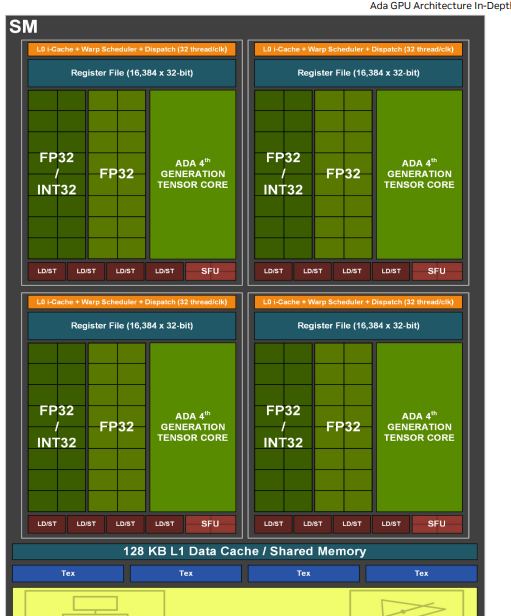 | |||||
| Ada Lovelace Architeture |
Training LLMs on GPU Clusters
open source book is here to change that. Starting from the basics, we’ll walk you through the knowledge necessary to scale the training of large language models (LLMs) from one GPU to tens, hundreds, and even thousands of GPUs, illustrating theory with practical code examples and reproducible benchmarks.
check here
Resources
-
https://apxml.com/posts/how-to-calculate-vram-requirements-for-an-llm
-
https://www.bentoml.com/blog/nvidia-data-center-gpus-explained-a100-h200-b200-and-beyond
-
https://www.bentoml.com/blog/nvidia-data-center-gpus-explained-a100-h200-b200-and-beyond
-
Inside NVIDIA GPUs: Anatomy of high performance matmul kernels
Write, run and benchmark GPU code to solve 50+ challenges with free access to T4, A100, H100, H200 and B200 GPUs.