
Pytroch
- A 1-dimensional tensor called a vector.
- Likewise, a 2-dimensional tensor is often referred to as a matrix.
- Anything with more than two dimensions is generally just called a tensor.
Tensor
A tensor is like a multi-dimensional array.
| Tensor | NumPy Equivalent | Shape |
|---|---|---|
| 0D | scalar | () |
| 1D | vector | (3,) |
| 2D | matrix | (3, 3) |
| 3D+ | array cube | (3, 3, 3) |
| Expression | Shape | Dimensions | Description |
|---|---|---|---|
[1, 2, 3] | (3,) | 1D | Flat list |
[[1, 2, 3]] | (1, 3) | 2D | 1 row, 3 columns |
[[[1, 2, 3]]] | (1, 1, 3) | 3D | 1 block, 1 row, 3 cols |
Dimensions
| Shape | What It Is | Real-Life Meaning | Used In |
|---|---|---|---|
[4] | 1D Vector | Marks of 1 student in 4 subjects | Simple ML inputs, features |
[3, 4] | 2D Matrix | 3 students × 4 subjects | Tabular data, linear models |
[2, 3, 4] | 3D Tensor | 2 schools × 3 students × 4 subjects | Sequences, batches |
[8, 3, 32, 32] | 4D Tensor | 8 images × 3 channels × 32×32 pixels | CNNs for image classification |
[8, 3, 5, 32, 32] | 5D Tensor | 8 video clips × 3 channels × 5 frames × 32×32 | 3D CNNs or video classification |
Visulization
2D
3 * 4
[
 [ 1,  2,  3,  4],      ← row 0
 [ 5,  6,  7,  8],      ← row 1
 [ 9, 10, 11, 12]       ← row 2
]
3D 2* 3 * 4
This is 2 matrices of shape [3, 4].
Tensor of shape (2, 3, 4):

[
  [                   # matrix 0
    [ 1,  2,  3,  4],  ← row 0
    [ 5,  6,  7,  8],  ← row 1
    [ 9, 10, 11, 12]   ← row 2
  ],

  [                   # matrix 1
    [13, 14, 15, 16],
    [17, 18, 19, 20],
    [21, 22, 23, 24]
  ]
]
[8, 3, 32, 32]
Used in computer vision.
- 8 images (batch size)
- 3 channels (RGB)
- Each image is 32×32 pixels
Shape: (8, 3, 32, 32)

For 1 image: similar to this we have 8 imave
  [
    R: [32×32 matrix],       ← Red channel
    G: [32×32 matrix],       ← Green channel
    B: [32×32 matrix]        ← Blue channel
  ]
5D [8, 3, 5, 32, 32]
- 8 videos
- 3 channels (RGB)
- 5 frames per video
- Each frame is 32×32 pixels
Shape: (8, 3, 5, 32, 32)

One video:
[
  R: [frame1, frame2, ..., frame5] ← Each 32×32
  G: [ ... ]
  B: [ ... ]
]
- we need to read from left to right
- Last two will actual 2D matrix which represent th vaule and read from left
Example
- we have 8,3,4,32,32
- So first we have 32 * 32 corss matrcis which we have 5 so 5 32 * 32 matrix
- Now we have 3 that above 5 cross matrix
- Then Now we have 8 above 3 corss matrix
x = torch.tensor([10, 20, 30, 40])
print(x.shape)  # torch.Size([4])

we have 4 subject scores: `[Math, Science, History, English]`


x = torch.tensor([[1, 2, 3, 4],
                  [5, 6, 7, 8],
                  [9, 10, 11, 12]])
print(x.shape)  # torch.Size([3, 4])

      Math  Sci  Hist  Eng
Stu1   1     2    3     4
Stu2   5     6    7     8
Stu3   9    10   11    12


3D
x = torch.rand(2, 3, 4)
print(x.shape)  # torch.Size([2, 3, 4])`

School 1:
  Stu1: [..]
  Stu2: [..]
  Stu3: [..]

School 2:
  Stu1: [..]
  Stu2: [..]
  Stu3: [..]

we took marks from **2 schools**, each has 3 students, each has 4 subjects

4D

x = torch.rand(8, 3, 32, 32)
print(x.shape)  # torch.Size([8, 3, 32, 32])

8 images, each with 3 color channels (R, G, B), 32×32 pixels

For 1 image:
   - Red channel → 32x32 matrix
   - Green channel → 32x32
   - Blue channel → 32x32


5D

5D Tensor: `[8, 3, 5, 32, 32]`

8 video clips
Each has 3 color channels
Each clip has 5 frames
Each frame is 32×32 image

Clip 1:
   Frame 1 → RGB image (32×32×3)
   Frame 2 → RGB image
   ...
   Frame 5

8 such clips
import torch

# Scalars and vectors
x = torch.tensor([1.0, 2.0, 3.0])
y = torch.ones(3)
z = torch.zeros(3)
w = torch.randn(3)  #generate random matric in shape of 3 * 3

# Reshaping
a = torch.randn(2, 3)

# Identity Matrix
eye = torch.eye(3)

start, end, step
arange = torch.arange(0, 10, 2) #tensor([0, 2, 4, 6, 8])


x = torch.tensor([1.2, 3.4], dtype=torch.float32)
y = torch.tensor([1, 2, 3], dtype=torch.int64)

# Change dtype
y_float = y.float()
x_int = x.int()

# Check dtype
print(x.dtype)       # torch.float32

by default it will be in 32byte

x = torch.rand(2, 3)

x.shape       # (2, 3)
x.size()      # same as shape
x.ndim        # Number of dimensions
x.numel()     # Total number of elements
device - CPU vs GPU
# Check if GPU available
device = torch.device("cuda" if torch.cuda.is_available() else "cpu")
print(device)

# Create tensor on device
x = torch.tensor([1.0, 2.0], device=device)

# Or move tensor to device
y = torch.tensor([3.0, 4.0])
y = y.to(device)
Tensor Reshaping & Viewing
t = torch.arange(12)

# Reshape
t2 = t.view(3, 4)
t3 = t.reshape(2, 2, 3)

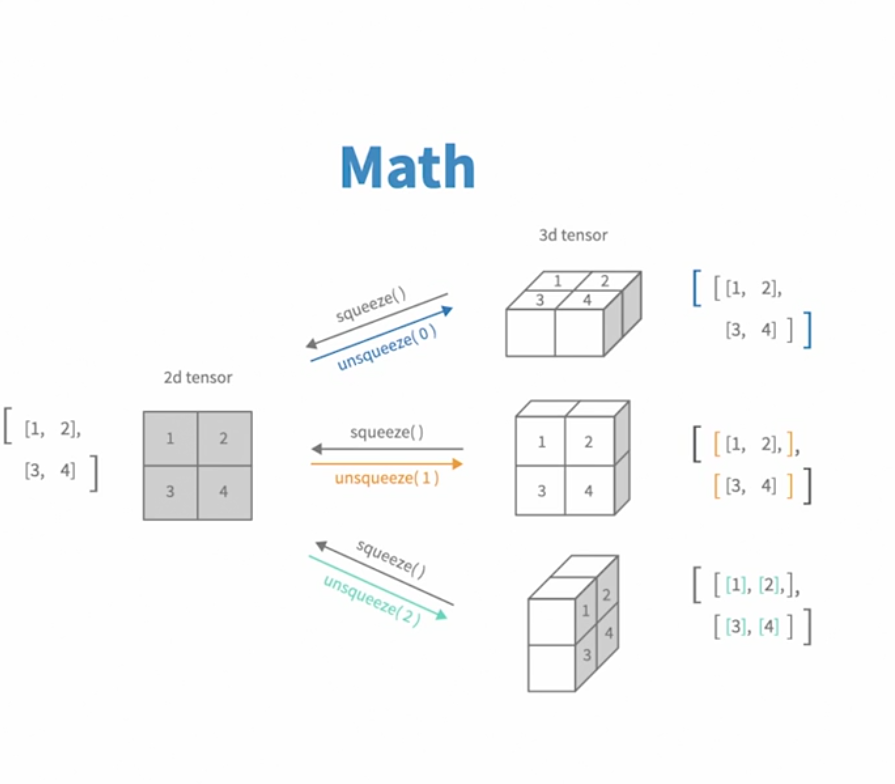
# Squeeze / Unsqueeze
x = torch.tensor([[1], [2], [3]])
x_sq = x.squeeze()       # Removes dim=1
x_unsq = x.unsqueeze(0)  # Adds dim=1 at index 0
unsqueeze
torch.unsqueeze(tensor)adds a new dimension of size 1 at the specifieddim(axis).- It does not change the data, just how it’s structured. Think of it as reshaping without losing information.
- Example: Imagine you have a flat photo (
[height, width]), but you want to place it in a frame ([1, height, width]), or put it inside an album ([1, 1, height, width]).
x = torch.tensor([1, 2, 3])  # shape: [3]
x_unsqueezed = x.unsqueeze(0)  # shape: [1, 3]
#it add 1 d to the zero dim


x_unsqueezed = x.unsqueeze(1)

# it willconvert the second dim as 1 so [3,1]
output will be
[[1],[2],[3]]
If a tensor has n dimensions, then:
- You can insert a new dimension at any position from
-n-1ton(inclusive). - dim ∈ [-n-1, n]
Sequeeze
- Removes dimensions of size 1 opsite to unsqueeze
Tensor Manipulation
x = torch.arange(12)        # [0, 1, ..., 11]
x = x.reshape(3, 4)         # Shape: (3, 4)
x = x.view(3, 4)            # Same as reshape

# 3*4
tensor([[ 0, 1, 2, 3], [ 4, 5, 6, 7], [ 8, 9, 10, 11]])- Reshape will create a new tensor but view just use the same memory so when we change in view it will refelect in original
view()requires the tensor to be contiguous in memory.
 Stacking and Joining
Stacking: stack() and cat()
a = torch.tensor([1, 2,3])
b = torch.tensor([4, 5,6])

stacked = torch.stack((a, b))        # Shape: (2, 2)
# Output:
# [[1, 2],
#  [3, 4]]

stacked0 = torch.stack((a, b), dim=0)  # same
stacked1 = torch.stack((a, b), dim=1)  # Shape: (2, 2), but rotated

stacked0
tensor([[1, 2, 3], [4, 5, 6]])

stacked1
tensor([[1, 4], [2, 5], [3, 6]])


a = torch.tensor([[1, 2,3]])
b = torch.tensor([[4, 5,6]])

cat0 = torch.cat((a, b), dim=0)
cat1 = torch.cat((a, b), dim=1)

tensor([[1, 2, 3], [4, 5, 6]])

tensor([[1, 2, 3, 4, 5, 6]])-
dim=0: stick down → more rows -
dim=1: stick sideways → more columns -
Stack : Concatenates a sequence of tensors along a new dimension.All tensors need to be of the same size.
-
torch.cat(): concatenates along existing dimension
| Operation | Output Shape | Comment |
|---|---|---|
cat([a, b], dim=0) | [4] | Just joins end to end |
stack([a, b], dim=0) | [2, 2] | Adds a new axis (rows) |
stack([a, b], dim=1) | [2, 2] | Adds new axis (columns) |
vstack([a, b]) | [2, 2] | Same as stack(..., dim=0) |
hstack([a, b]) | [4] | Same as cat(..., dim=0) |
dstack([a, b]) | [1, 2, 2] | For 3D stacking (depth) |
Matrix mul
touch.matmul(a,b)Indexing
         column-0   column-1   column-2
row-0 →    10         20         30
row-1 →    40         50         60
row-2 →    16         17         18
- Rows are will read from top to bottom and column are left to right
- In matrices/tensors, the first dimension is rows (vertical)
- The second dimension is columns (horizontal)
import torch

x = torch.tensor([[10, 20, 30],
                  [40, 50, 60]])


x[ row, column]

x[0]  -> [10, 20, 30]
x[1, 2] ->  60

x[:, 1] -> [20, 50]
- Give me all row from column1 (row read from top to bottom)
x[0, :] [10, 20, 30]

- `:` → All rows
- `1` → Column index 1 (second column)
Reproducibility
get the same results every time you run your code, which is essential for debugging, experiments, and publishing results.
import torch
import random
import numpy as np

SEED = 42

random.seed(SEED)
np.random.seed(SEED)
torch.manual_seed(SEED)


for gpu

torch.cuda.manual_seed(SEED)
torch.cuda.manual_seed_all(SEED)
PyTorch offers deterministic options to avoid non-deterministic GPU ops (e.g., CuDNN).
torch.backends.cudnn.deterministic = True
torch.backends.cudnn.benchmark = False

Force Single-Threaded Execution
torch.set_num_threads(1)
deterministic=Trueensures reproducible results.benchmark=Falsedisables cuDNN auto-tuner that can introduce randomness in algorithm selection.
Broadcasting
Broadcasting is a method PyTorch uses to automatically expand the dimensions of a tensor during arithmetic operations without making actual copies of data. It works by aligning shapes so that operations like +, -, *, / can be applied to tensors with mismatched shapes.
Broadcasting Rules
| Case | What happens |
|---|---|
| Equal | Do nothing |
| One of them is 1 | Expand that dimension to match the other |
| Mismatch and not 1 | ❌ Error |
Example
a = torch.tensor([[1], [2], [3]])  # Shape: [3, 1]
b = torch.tensor([10, 20, 30])     # Shape: [3]
result = a + b                     # Shape: [3, 3]
print(result)

[
 [11, 21, 31],
 [12, 22, 32],
 [13, 23, 33]
]


a.shape = [3, 1]
b.shape = [3] → reshaped to [1, 3] (auto)

Now:
[3, 1]
[1, 3]
→ Broadcasted to [3, 3]
.expand(): Virtual view, no memory copied
- Changes shape without copying data.
- Only works if you’re expanding size 1 → N (i.e., it can only repeat singleton dimensions).
x = torch.tensor([[1], [2], [3]])  # Shape: [3, 1]
x_expand = x.expand(3, 4)          # Shape: [3, 4]
print(x_expand)
.repeat(): Actual data copy
- Repeats tensor content physically. Uses more memory.
- Good for generating repeated patterns.
x = torch.tensor([[1], [2], [3]])  # Shape: [3, 1]
x_repeat = x.repeat(1, 4)          # Shape: [3, 4]
print(x_repeat)
| Operation | Output Shape | Example Output | Notes |
|---|---|---|---|
x.expand(2, 3) | [2, 3] | [[9, 9, 9], [8, 8, 8]] | Virtually expanded |
x.repeat(1, 3) | [2, 3] | [[9, 9, 9], [8, 8, 8]] | Copied data |
x.repeat(2, 1) | [4, 1] | [[9], [8], [9], [8]] | Pattern repeated in rows |
PyTorch Workflow
pytroch Internal
A .pth file is just a PyTorch model checkpoint file.
.pth= PyTorch- It’s basically a Python pickle (
.ptand.pthare often interchangeable) - It stores:
- Model weights (the trained parameters: numbers in tensors)
- Optionally, other stuff like the training state, optimizer state, epoch number.
A .pth is not executable by itself — you need:
- The model architecture code (the Python class defining the layers).
- The
.pthweights. - Some inference code to run inputs through the model.
import torch
import torch.nn as nn

# 1️⃣ Define the same architecture
class MyModel(nn.Module):
    def __init__(self):
        super().__init__()
        self.fc = nn.Linear(10, 2)

    def forward(self, x):
        return self.fc(x)

# 2️⃣ Create the model instance
model = MyModel()

# 3️⃣ Load the weights
model.load_state_dict(torch.load("model.pth"))

# 4️⃣ Set to eval mode for inference
model.eval()

# 5️⃣ Run inference
with torch.no_grad():
    x = torch.randn(1, 10)  # Example input
    output = model(x)
    print(output)
.pth is a PyTorch-specific checkpoint, so usually you:
- Export to ONNX → for general-purpose cross-framework inference.
- Export to TorchScript → for PyTorch-specific compiled inference.
- Convert to TensorRT → optimized GPU inference.
- Export to CoreML → for iOS.
- Export to TFLite → for edge/mobile.
- Export to GGUF or other quantized formats → for efficient LLMs (like llama.cpp).
Resources
- PyTorchZeroToAll
- PyTorch Tutorials
- http://blog.ezyang.com/2019/05/pytorch-internals/
- https://0byte.io/articles/pytorch_introduction.html
- https://gimletlabs.ai/blog/ai-generated-metal-kernels
FLOPs Rule of Thumb for Matmuls: For a matrix multiplication of dimensions (A x B) * (B x C) resulting in (A x C), the number of flops is approximately 2 * A * B * C