
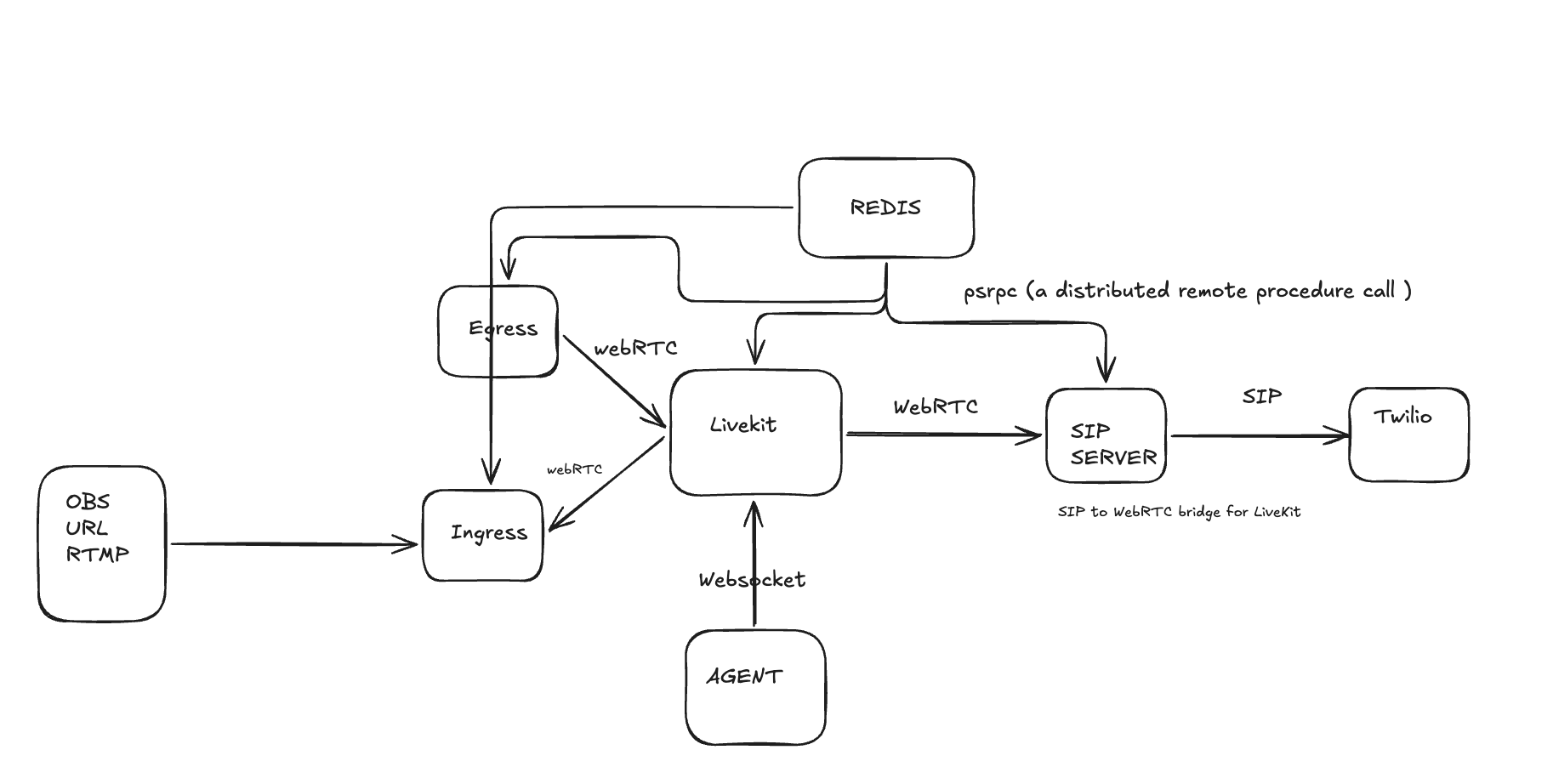
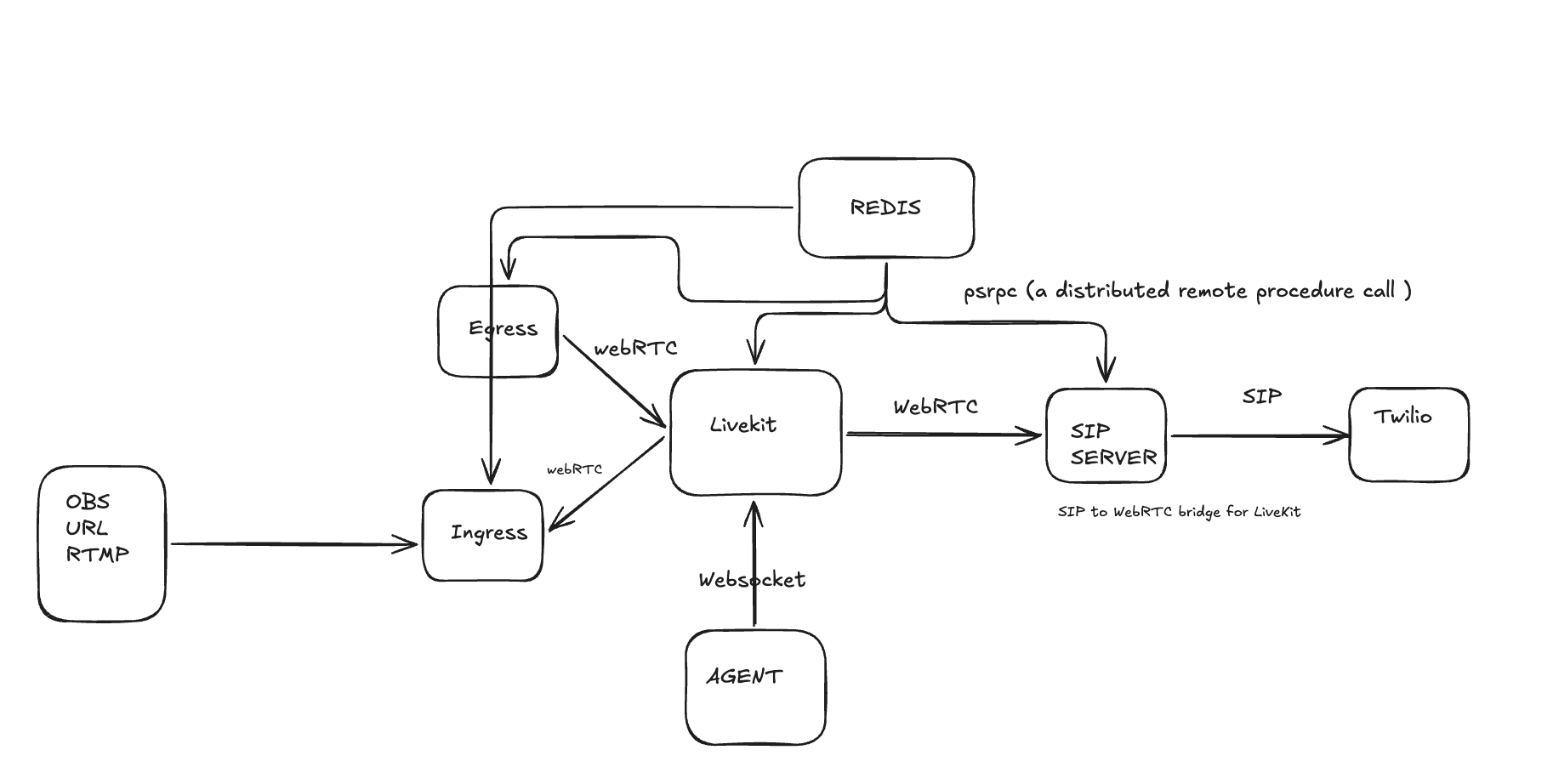
The main component of livekit server are
- Livekit server center
- Ingress
- Egress
- Agent
- SIP server
Egress
-
Purpose: record or stream room media (individual tracks or room composites) for archiving, livestreaming, or downstream distribution.
-
How it works (1‑line flow): LiveKit server (or API) requests an Egress job → Egress service joins the room as a participant/subscriber → Egress captures/composites/transcodes the media → Egress writes files (MP4/WebM/HLS), uploads to storage (S3), or streams to RTMP/SRT endpoints.
-
Inputs: LiveKit room tracks (subscribes via wsUrl + token). It does not ingest RTMP/WHIP—it subscribes to LiveKit.
-
Outputs: MP4, WebM, HLS, segmented outputs, or live streams to RTMP/SRT (and can upload to S3/GCS).
-
Control: started via LiveKit server RPC/API (CreateEgress), passing params (output destinations, layout, tracks to include).
-
Deployment: runs as a separate service/process (scales independently), with health/metrics like Ingress.
Ingress
Acts as an ingestion bridge: accept external live or file streams (RTMP, WHIP, HLS/MP4/UDP), optionally transcode, and publish them into LiveKit rooms as participants/tracks.
Coordinates with LiveKit server for session creation and state via Redis/psrpc.
Runs per‑ingress handlers that do media processing and handle the actual publishing over the LiveKit protocol (WebSocket + WebRTC tracks).
Provides health, capacity, and stats so orchestration controllers can scale/manage ingress capacity.
Architecture and main components (conceptual)
- Ingress service (long‑running process)
- Listens for incoming publishers: RTMP server (port 1935), WHIP HTTP/WebRTC endpoint (port 8080), and URL‑pull handlers.
- Holds global state, capacity monitoring, health/prometheus endpoints, and orchestration logic.
- Talks to LiveKit and to other local per‑ingress handlers/worker processes.
- Per‑ingress handlers / process manager
- When an incoming publisher starts, the service validates the session, then either:
- Runs a per‑ingress handler process (GStreamer pipeline or other command) to do any decoding/transcoding and to forward media into the LiveKit room; or
- In non‑transcoding mode, acts as a simple relay/publisher without spawning a heavy process.
- These handlers do the heavy work: receiving RTP/RTMP, transcode, and publish to LiveKit.
- When an incoming publisher starts, the service validates the session, then either:
- LiveKit server / IOInfo service
- The LiveKit server (or a control plane component) creates Ingress sessions (CreateIngress) and provides the Ingress service with a stream key / token / wsUrl / other info required for the ingress to join a specific LiveKit room.
- LiveKit and Ingress coordinate via Redis + psrpc (message bus) for control and state updates.
- Redis + psrpc
- Redis is used for the message bus, shared state, and to let LiveKit server and Ingress exchange control messages (GetIngressInfo, CreateIngress, state updates).
- Media toolchain
- GStreamer (or equivalent pipelines) is used for ingestion, decoding/encoding, simulcast layering, and making the final tracks compatible with WebRTC. The repo runs GStreamer pipelines inside per‑ingress processes.
- State, monitoring and lifecycle
- The service stores ingress state in Redis, monitors CPU capacity and per‑ingress stats, exposes health/availability endpoints, and enforces capacity limits.
Concrete examples
-
Example 1 — OBS → LiveKit (RTMP):
- Create ingress (LiveKit or CLI): livekit-cli create-ingress → returns rtmp://my.domain/x/abc123
- In OBS, Stream → Service type RTMP, URL rtmp://my.domain/x/abc123, start streaming.
- Ingress receives
 , spawns handler, connects to LiveKit room (using wsUrl/token), publishes tracks. Browser clients in the room now see the stream as a participant.
-
Example 2 — WHIP encoder → LiveKit:
- Create ingress → WHIP endpoint http://my.domain/w/abc123
- WHIP client POSTs offer and streams via WebRTC to that endpoint.
- Ingress completes WebRTC handshake, receives RTP, publishes into LiveKit room.
SIP server
A SIP-to-WebRTC bridge that connects SIP (telephony) endpoints to LiveKit rooms so phone calls can join LiveKit sessions (and vice‑versa). It accepts and sends SIP INVITEs, handles authentication/dispatching to LiveKit rooms, and translates media between RTP/SIP and LiveKit’s media pathways.
How it fits together (runtime shape)
-
cmd/livekit-sip/main.go loads YAML config, sets up Redis-backed message bus and psrpc client, constructs the SIP Server (pkg/sip) and a Service (pkg/service) which is the handler bridging SIP calls to LiveKit using psrpc/rpc.
-
pkg/sip implements SIP signaling (INVITE/ACK/BYE/OPTIONS), transports (UDP/TCP/TLS), authentication (digest), dispatch logic (maps call to LiveKit room/trunk), and media pipeline (RTP ports, codec negotiation, silence filling, media processing).
-
pkg/service contains the code that calls into LiveKit (Create participants, update call state, observability) via the LiveKit RPC client over the Redis/psrpc message bus.
-
Media flow uses RTP (ports 10000–20000 by default) and SDP for capability negotiation; media-codec translation / processing uses the media SDK and libopus where necessary.
Protocols and connectivity
-
Signaling: SIP (RFC 3261 semantics) over UDP/TCP and optional TLS (SIPS). The server listens on configured SIP ports (default 5060) and registers request handlers for INVITE, ACK, BYE, OPTIONS, NOTIFY.
-
SDP: used in INVITE/200/ACK flows to negotiate media parameters.
-
Media: RTP/RTCP for audio streams (default port range 10000–20000). Codecs supported/translated are handled in media_codecs.go and media pipeline code (G.711, PCM16LE, G722, Opus where applicable).
-
Authentication: SIP Digest and optional credential configuration per SIP Trunk. Trunk credentials are validated and can be mapped to LiveKit projects/trunks.
-
LiveKit integration: Control/metadata via LiveKit RPC over a Redis-backed psrpc message bus. The SIP service calls LiveKit server APIs (via rpc.NewIOInfoClient) and the LiveKit server stores/controls SIP Trunk and Dispatch Rule resources.
Flow
Inbound call flow (PSTN/SIP provider → LiveKit room)
-
Network-level arrival
- Provider (e.g., Twilio) sends a SIP INVITE to the SIP service public IP and SIP port (default 5060) over UDP/TCP or TLS (SIPS).
- The SIP service listens on UDP/TCP/TLS as configured (pkg/sip/server.go startUDP/startTCP/startTLS).
-
SIP request handling
- The server’s INVITE handler (onInvite / inbound.go) receives the INVITE request and parses headers + SDP (pkg/sip/protocol.go).
- The server immediately responds with provisional responses as needed (100 Trying, 180 Ringing) per SIP UAC/UAS flow.
-
Authentication / trunk identification
- The service determines the SIP Trunk (inbound_addresses, inbound_numbers_regex) and authenticates the request. Authentication types supported include SIP Digest and optional credential matching. This is implemented via the Handler.GetAuthCredentials flow (pkg/sip types and service glue).
- If digest challenge is needed, SIP 401/407 will be used and the service tracks challenge state (inProgressInvite / challenge) to detect retries.
-
Dispatch decision (which LiveKit room / how to join)
- The service calls DispatchCall (Handler.DispatchCall) to map the incoming call to a LiveKit project/room and determine options (roomName, whether a pin is required, headers→attributes mapping). Those dispatch rules come from resources created in LiveKit (SIP Trunk + Dispatch Rule), and the code that calls LiveKit lives in pkg/service/service.go + psrpc.go.
-
Create LiveKit participant & call state
- The SIP service uses the psrpc Redis message bus (psrpc.NewRedisMessageBus, rpc.NewIOInfoClient in main.go) to call the LiveKit server to create a participant or attach an inbound SIP participant to the room, passing call metadata (trunk id, headers, observability).
- It stores call state in-memory and (where applicable) in Redis for cross-instance coordination.
-
SDP / media negotiation
- The SIP INVITE contains an SDP offer. The SIP service converts the SDP to match LiveKit’s expectations, chooses codecs and RTP parameters (media_codecs.go, media_port.go).
- The SIP service answers with a 200 OK containing SDP answer (or sends an offer if the LiveKit side needs to offer). Once 200 OK is received and ACKed, media can flow.
-
RTP / media pipeline
- After SDP completes, RTP streams are set up. The SIP service binds RTP ports (default range 10000–20000) and forwards/bridges RTP between the SIP endpoint and LiveKit’s media pipeline (media_pipeline.go).
- The code performs codec negotiation and may transcode (e.g., G.711 ←> PCM ←> LiveKit format) using the media SDK and libopus as needed. The repo includes support for G711, PCM16LE, G722 etc. (res/ README shows audio resource samples).
- DTMF support: RFC2833 (RTP event) handling is implemented so DTMF events can be passed to the LiveKit side or read by the SIP service.
- Under the hood:
- Incoming RTP payloads (often G.711 μ-law/8 kHz from PSTN) are received by the SIP service.
- The service decodes RTP payloads into PCM frames (media_port / media_pipeline).
- It resamples and converts to the LiveKit internal sample rate (RoomSampleRate = 48000) and encodes into Opus (or publishes PCM depending on LiveKit configuration) using the media SDK and codec wrappers (pkg/media/opus and msdk).
- The service uses the LiveKit SDK to publish the track (this goes through the WebRTC PeerConnection to LiveKit → server).
-
Call control / lifecycle
- BYE from endpoint ⇒ SIP service tears down LiveKit participant and cleans RTP sockets/state.
- Disconnects, timeouts, or maxCallDuration from dispatch cause a similar teardown. Observability and metrics are emitted (stats/Jaeger/Prometheus).
Outbound call flow (LiveKit room → PSTN/SIP provider)
-
Trigger from LiveKit
- A LiveKit participant or server-side action triggers an outbound call. The Service component creates an outbound call request (pkg/service), selects a SIP Trunk to use and supplies destination number and caller ID.
-
Construct and send INVITE
- The SIP service constructs an INVITE with SDP offer, credentials (if the trunk requires outbound authentication), and sends it to the trunk’s configured outbound_address (pkg/sip/client.go and outbound.go).
- It handles authentication required by the provider (Digest or credentials), and may retry on 401/407.
-
Provider response and SDP negotiation
- Provider (e.g., Twilio) returns provisional responses (100/180) and eventually 200 OK with SDP answer. The SIP service processes the SDP and opens RTP ports accordingly.
-
Media bridging
- RTP from provider endpoint flows to the SIP service; the media pipeline forwards audio into LiveKit (same pipeline as inbound). Transcoding may occur if codecs differ.
-
Call teardown
- BYE from provider or LiveKit triggers teardown and resource cleanup.
Protocols & data planes used
- Signaling: SIP (INVITE/ACK/BYE/OPTIONS/NOTIFY/REFER etc.). The server implements INVITE, ACK, BYE, OPTIONS, NOTIFY and NoRoute handling (pkg/sip/server.go).
- Media-negotiation: SDP (m=audio lines; codecs, ports, IPs).
- Media transport: RTP/RTCP over UDP (typical). TLS is for signaling only (SIPS) unless SRTP is explicitly used (repo focuses on plain RTP + codec handling).
- Inter-service control: LiveKit RPC over psrpc which runs on Redis message bus — control and metadata are passed to the LiveKit server via RPC (see cmd/main.go creating psrpc client and pkg/service/psrpc.go).
- Auth: SIP Digest (realm/nonce) and optional trunk-level username/password. Providers may also use IP ACLs or credential lists.
Example minimal SIP INVITE → 200 OK sequence (behavioral)
- Provider → SIP service: INVITE sip:1234@server.example.com SIP/2.0
- SDP: offer with m=audio, codecs (PCMU,PCMA,opus), RTP port 40000
- SIP service → Provider: 100 Trying
- SIP service authenticates / dispatches → queries LiveKit (psrpc)
- SIP service → Provider: 180 Ringing (or 183 if early media)
- LiveKit side accepted and media setup completed
- SIP service → Provider: 200 OK (SDP answer with its RTP IP/port/codecs)
- Provider → SIP service: ACK
- RTP flows provider ←> SIP service; SIP service ←> LiveKit media pipeline