
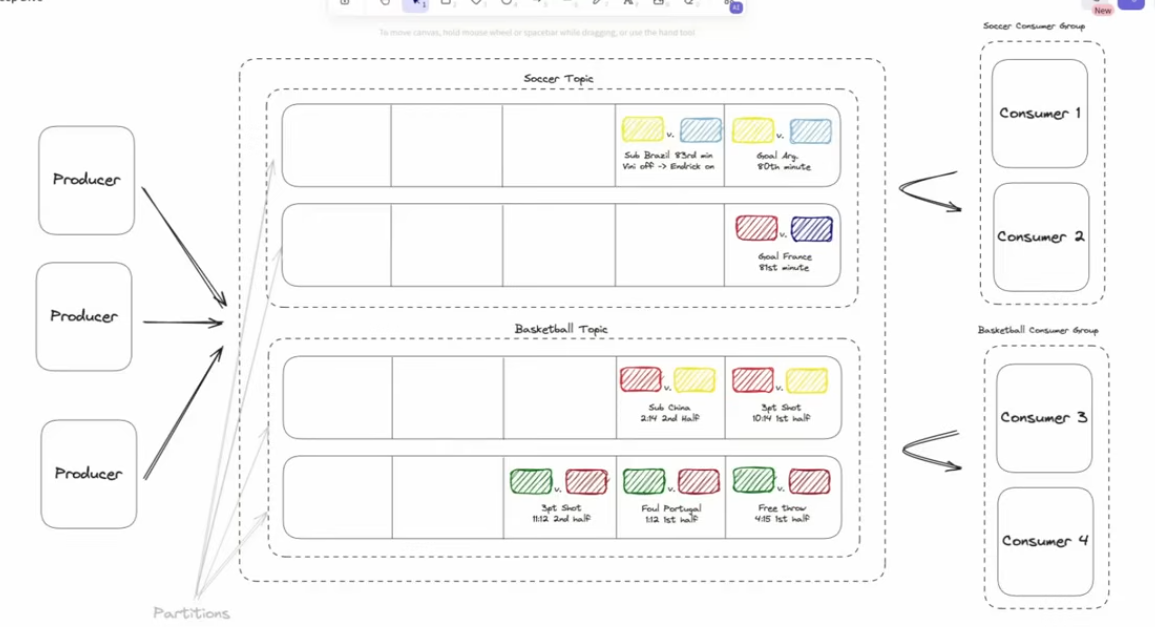
| Concept | Description | Analogy |
|---|---|---|
| Topic | A named logical log (e.g., "user-events", "orders"). | A folder name under which events are stored. |
| Partition | A physically separate, ordered, immutable sequence of records within a topic. | Each file under that folder. |
| Offset | The numeric position of each record within a partition (0, 1, 2, …). | Line number in the file. |
| Broker | A Kafka server that stores and serves partitions. | A machine holding pieces of the log. |
| Cluster | A set of brokers working together (sharing partitions and replication). | A distributed filesystem for logs. |
| Producer | A client that appends (writes) messages to a topic. | A process writing to the end of the log. |
| Consumer | A client that reads (and tracks its offset) from a topic. | A process reading from some line number onward. |
| Consumer Group | A group of consumers that together share the load of reading a topic (each partition goes to one consumer). | A team dividing sections of a book. |
| Replication | Kafka keeps copies of each partition across brokers for fault tolerance. | Mirroring files across servers. |
| Leader / Follower | One broker is the leader for each partition; others are followers that replicate its data. | Primary and backup copies. |
-
Producer → Broker
- Producer sends a record to a topic.
- Kafka decides which partition to place it in (based on key or round-robin).
- Broker appends the record to the end of that partition’s log.
-
Broker → Disk
- Message is written to disk sequentially (fast) and replicated to follower brokers.
-
Consumer Group → Broker
- Consumers poll the broker for new messages.
- Each consumer tracks its offset — “last read position”.
- Broker does not track consumption state; consumers do.
-
Commit offset
- After processing, consumers commit offsets (to Kafka itself, often under a special internal topic
__consumer_offsets). - If a consumer crashes, it resumes from the last committed offset.
- After processing, consumers commit offsets (to Kafka itself, often under a special internal topic
Partitions and scalability
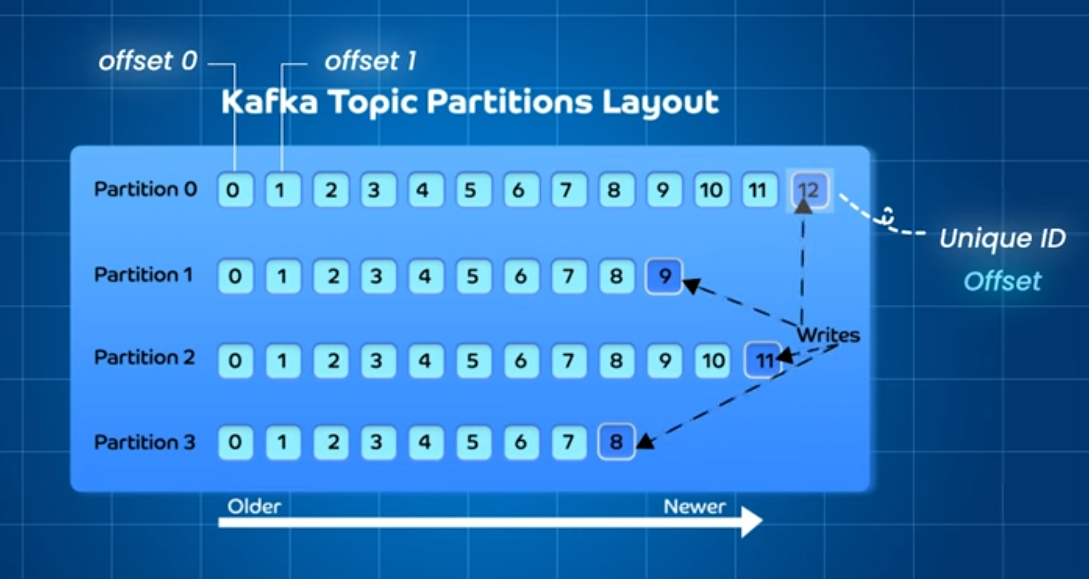
Why partitions exist:
If a topic was just one single log file, only one broker and one consumer could work efficiently at a time bottleneck.
So Kafka splits each topic into partitions:
- Each partition is independent, so different brokers can store them.
- Consumers can read partitions in parallel.
- Partitioning gives both horizontal scalability and ordering per partition.
- By default the message are accepted by partion in round robin manner but if we want we can add unique key foreach partion and make it unique
Key trade-off: Ordering is guaranteed only within a partition, not across the whole topic.
Retention and log compaction
Kafka doesn’t delete messages once consumed it deletes them based on retention policy.
Two main types:
- Time-based retention – e.g. keep 7 days of data.
- Size-based retention – e.g. keep last 1 GB.
- Log compaction (optional) – keep latest record per key, discarding older ones.
This makes Kafka usable as:
- A data pipeline buffer (streaming system).
- Or a database changelog (state reconstruction).
Imagine Kafka as a distributed filesystem for events, where:
- Each topic = directory
- Each partition = append-only file
- Each record = line in file
- Brokers = nodes storing those files
- Consumers = clients tailing those files
internal archi course https://developer.confluent.io/courses/architecture/get-started/
https://cefboud.com/posts/exploring-kafka-internals/
Kafka’s Zero-Copy Optimization: Simplified
If you’ve come across Kafka, you might have heard about its zero-copy optimization, a technique aimed at reducing unnecessary data copies. Let’s break it down:
What is Zero-Copy? Zero-copy operations minimize unnecessary data duplication, although they don’t literally make zero copies.
Kafka’s Use of Zero-Copy Kafka leverages the OS’s zero-copy optimization to bypass the Kafka broker Java program entirely when data is transferred from the page cache to the socket buffer.
Traditional Data Transfer (Without Zero-Copy)
- Read buffer (OS page cache) - Stores data for quick access.
- Socket buffer - Manages data packets.
- NIC buffer - Network card’s byte buffer.
- DMA (Direct Memory Access) - Allows hardware to access memory without the CPU.
Steps:
- Disk to OS buffer (DMA copy, user to kernel mode).
- OS buffer to app buffer (kernel to user mode).
- App buffer to socket buffer (user to kernel mode).
- Socket buffer to NIC buffer (DMA copy, kernel to user mode).
Optimized Data Transfer (With Zero-Copy)
Kafka stores data in a binary format compatible with its responses, skipping unnecessary steps:
- The read buffer copies data directly to the NIC buffer.
- The socket buffer stores read buffer pointers, enabling the DMA engine to read directly from memory.
Benefits of Zero-Copy
- Fewer user/kernel mode switches (reduced from 4 to 2).
- Same number of DMA copies (2).
- One minimal CPU copy of pointers (2 fewer CPU copies).
The Reality Check
Despite the efficiency gains, zero-copy might not significantly impact most Kafka deployments:
- The network often saturates before CPU becomes a bottleneck.
- Encryption and SSL/TLS prevent zero-copy use.
Kafka remains performant even without zero-copy optimization.
-
What is Kafka?
Kafka is a distributed event store and a streaming platform. It began as an internal project at LinkedIn and now powers some of the largest data pipelines in the world in orgs like Netflix, Uber, etc. -
Kafka Messages
Message is the basic unit of data in Kafka. It’s like a record in a table consisting of headers, key, and value. -
Kafka Topics and Partitions
Every message goes to a particular Topic. Think of the topic as a folder on your computer. Topics also have multiple partitions. -
Advantages of Kafka
Kafka can handle multiple producers and consumers, while providing disk-based data retention and high scalability. -
Kafka Producer
Producers in Kafka create new messages, batch them, and send them to a Kafka topic. They also take care of balancing messages across different partitions. -
Kafka Consumer
Kafka consumers work together as a consumer group to read messages from the broker. -
Kafka Cluster
A Kafka cluster consists of several brokers where each partition is replicated across multiple brokers to ensure high availability and redundancy. -
Use Cases of Kafka
Kafka can be used for log analysis, data streaming, change data capture, and system monitoring.
Kafka vs Rabbitmq
| Type | Philosophy | Representative System |
|---|---|---|
| Message Queue (MQ) | Deliver messages to consumers and remove them once processed. | RabbitMQ |
| Distributed Log (Commit Log) | Persist an ordered, append-only sequence of records; consumers read at their own pace. | Kafka |
RabbitMQ
RabbitMQ implements the AMQP (Advanced Message Queuing Protocol) model.
Mechanism
- Producers send messages to exchanges.
- Exchanges route messages to queues based on routing rules.
- Consumers read messages from queues, usually removing them after processing.
Internally
- Messages are stored in memory or disk queues.
- Once a consumer ACKs a message, RabbitMQ deletes it (it’s considered consumed).
- If no consumer ACKs, it can be requeued or dead-lettered.
Effect
- Queue = transient pipeline between producer and consumer.
- Designed for low-latency, per-message reliability.
Kafka the distributed log model
Kafka is fundamentally a distributed append-only log.
Mechanism
- Producers append records to topics, which are divided into partitions.
- Each partition is a sequential, immutable log file.
- Consumers track their own offset (position) in each partition.
Internally
- Kafka writes messages sequentially to disk (OS page cache makes this fast).
- Messages are not deleted on consumption — only after a retention period (time or size based).
- Consumers can re-read or replay messages by resetting offsets.
Effect
- Topics = immutable history of events.
- Ideal for stream processing, event sourcing, analytics pipelines, etc.
Kafka vs Rabbitmq
🐇 RabbitMQ
- Messages go to queues.
- Consumers compete for messages (work queues).
- Once a message is consumed, it’s gone.
🦁 Kafka
- Messages go to topics.
- Each topic is split into partitions.
- Consumers read at their own pace.
- Messages are not deleted after consumption; stored for a configured time (hours/weeks).
RabbitMQ queue ≈ Kafka topic partition log.
Message Delivery Model
RabbitMQ (Push)
- Server pushes messages to consumers.
- Good for workloads where tasks must be balanced across workers.
- Might overwhelm slow consumers (handled using prefetch).
Kafka (Pull)
- Consumers pull messages when ready.
- Perfect for streaming and analytics, where consumers process data at different speeds.
RabbitMQ = “I send work to you.”
Kafka = “Take work when you’re ready.”
Imagine Kafka is like YouTube:
- YouTube (Kafka) stores videos (messages) on disk.
- You (consumer) pull the videos when you want.
- You can rewind, pause, watch later.
RabbitMQ is like live phone call:
- The other person (broker) pushes words to you in real time.
- If you fail to hear it, it’s gone unless asked again.
Message Persistence & Replay
RabbitMQ
- Message removed after acknowledged.
- Replay is possible only with dead-letter exchanges or requeueing (not standard).
Kafka
- Stores messages for a retention period (e.g., 7 days).
- Consumers can rewind and re-read entire history.
Kafka behaves like a distributed file system + queue combined.
RabbitMQ
- ack → confirms a message
- nack → requeue
- can redeliver messages immediately
Kafka
- Consumers use offset commits.
- “Ack” in Kafka = committing an offset.
- Re-delivery = resetting the offset backward.
- No message deletion = full replay possible.
RabbitMQ Clustering
- Nodes share queue metadata, but queue contents are not evenly distributed.
- For HA, you need mirrored queues / quorum queues.
- Clustering is more complex and not meant for massive distributed logs.
RabbitMQ Cluster Model:
- Metadata replicated
- Queue messages often stored on one node
- Can replicate queue (quorum queue) for HA
Kafka Clustering
Kafka is inherently designed for:
- Distributed storage
- Replication
- High throughput
Each topic partition:
- Lives on one broker (leader)
- Replicas exist on other brokers for HA
- ZooKeeper/KRaft manages metadata but latest version they have builtin dont need zookeeper we can use kRaft
Kafka Cluster Model:
- Partitions are distributed across nodes.
- Replication factor = HA.
- If leader fails, a follower becomes leader automatically.
| RabbitMQ Concept | Kafka Equivalent |
|---|---|
| Exchange | No exact equivalent (producer picks topic + partition) |
| Direct exchange | Key-based partition routing |
| Topic exchange | Partition strategy + topic naming convention |
| Fanout exchange | Multiple consumer groups |
| Delayed exchange | Retry topics / delay queues |
| Queue | Topic partition |
| Binding | Topic name + partitioner function |
| Ack | Offset commit |
| Requeue | Offset reset back |
| Mirrored/Quorum queue | Partition replication |
| Dead-letter exchange | Dead-letter topic |