
The “WAT” Framework for Automation
To effectively use Claude Code, it is best to organize projects using the WAT Framework, which separates concerns to ensure reliability.
• Workflows (Layer 1): These are Markdown files (SOPs) stored in a workflows folder. They are written in plain language and define the objective, required inputs, edge cases, and the sequence of steps, effectively serving as the “manager’s instructions”.
• Agents (Layer 2): This is Claude Code itself. It sits between the workflow and the tools, responsible for reasoning, coordination, and handling failures.
• Tools (Layer 3): These are deterministic scripts (usually Python files stored in a tools folder) that execute specific actions, such as scraping a website or querying an API. API keys are handled via .env files to prevent hard-coding secrets
The CLAUDE.md System Prompt
• Project Memory: The CLAUDE.md file acts as the system prompt or “brain” for a specific project. Without it, the agent is generic; with it, the agent understands the specific product, tools, and framework it is working within
Agents
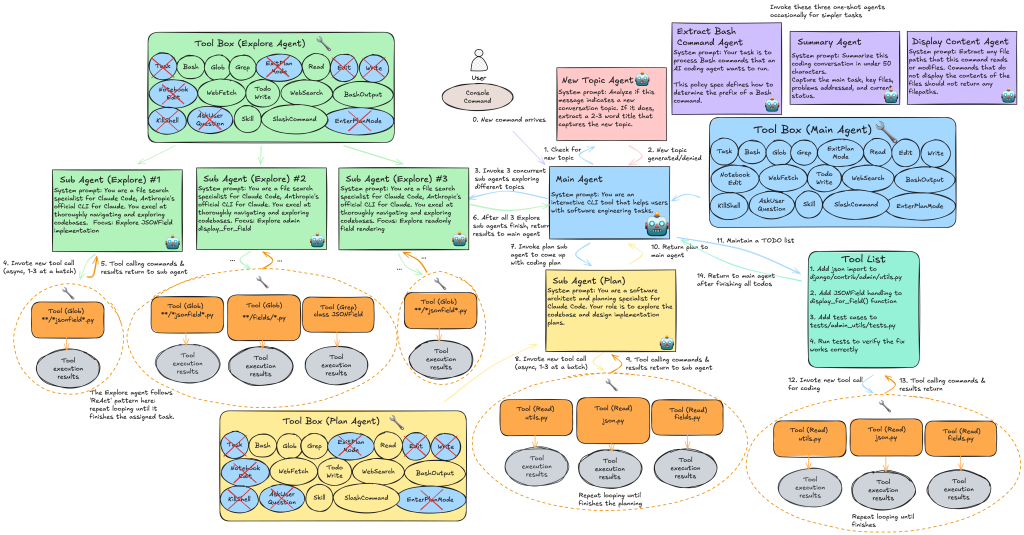
Built-in Agents: Claude Code comes with pre-configured agents: ◦ Bash Agent: Specialized for terminal commands and Git. ◦ Explore Agent: Uses the Haiku model (fast/cheap) to search codebases and identify patterns without burning expensive tokens. ◦ Planning Agent: Uses Opus (high intelligence) to investigate requirements and formulate architectural plans. ◦ Guide Agent: Can be queried specifically about Claude Code features.
Custom Agents: Users can create specialized agents via the /agents command to enforce specific standards. ◦ Example: A “UI Expert” agent can be given a system prompt to enforce “Neo-Brutalism” design (hard shadows, vibrant colors) and responsiveness. ◦ Example: A “Code Reviewer” agent can be set to use Haiku to check for commenting and modularity, as Haiku is sufficient for spotting glaring issues, whereas Opus or Sonnet should be reserved for the “Coder” agent.
-
https://github.com/Wirasm/PRPs-agentic-eng?tab=readme-ov-file
- A collection of prompts for claude (Product Requirement prompts)
-
Prompt caching is a prefix match. Any change anywhere in the prefix invalidates everything after it. Design your entire system around this constraint. Get the ordering right and most of the caching works for free.
-
Use messages instead of system prompt changes. You may be tempted to edit the system prompt to do things like entering plan mode, changing the date, etc. but it would actually be better to insert these into messages during the conversation.
-
Don’t change tools or models mid-conversation. Use tools to model state transitions (like plan mode) rather than changing the tool set. Defer tool loading instead of removing tools.
-
Monitor your cache hit rate like you monitor uptime. We alert on cache breaks and treat them as incidents. A few percentage points of cache miss rate can dramatically affect cost and latency.
-
Fork operations need to share the parent’s prefix. If you need to run a side computation (compaction, summarization, skill execution), use identical cache-safe parameters so you get cache hits on the parent’s prefix.
For UI design
laude to create flowcharts in Flowy format. Great for:
- Process flows
- State machines
- Architecture diagrams
- Decision trees
iPhone mockups in Flowy. Perfect for:
- Screen designs before building
- Iterating on UI layout visually
- Communicating design intent
The mockup format includes:
- Device frames (notch, home bar, status bar)
- iOS-style components (buttons, cards, progress bars)
- Proper safe area handling
TIPS
- Open a new terminal session. Run the command
claude /insights. - Claude should begin working on your insights report. When it’s done, it will give you a link to a file named
report.html. Copy it into an empty folder. - Open your code editor (we use Cursor). Start the webpage with
cmd + shift + pand find the “Open Live Server” tool. - You’ll see the report outlining what worked, what didn’t, and how to improve. Use the “Existing CC Features to Try” section for new project instructions.
Check out here
- https://github.com/ykdojo/claude-code-tips?tab=readme-ov-file#tip-0-customize-your-status-line
- https://github.com/thedotmack/claude-mem
- https://github.com/wshobson/agents
- https://github.com/obra/superpowers
- https://github.com/OthmanAdi/planning-with-files
- https://github.com/K-Dense-AI/claude-scientific-skills
- https://github.com/zebbern/claude-code-guide
- https://github.com/Yeachan-Heo/oh-my-claudecode
- https://x.com/trq212/status/2024574133011673516 (series of blog writtent by dev of claude code)
- https://github.com/affaan-m/everything-claude-code